MCP Server

Your OKRs, where
everyday work lives

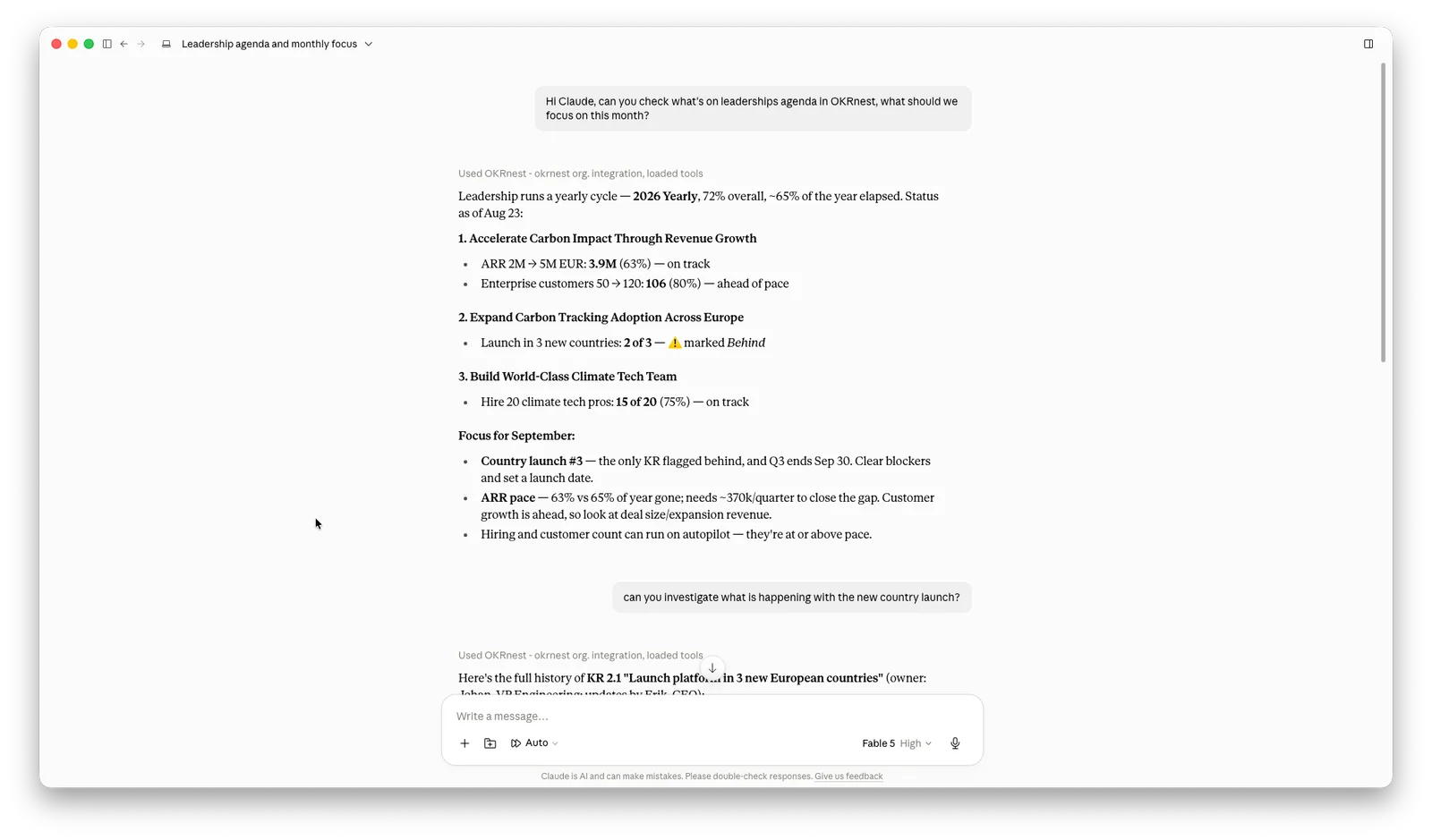
Connect OKRnest to Claude, ChatGPT or any MCP-compatible assistant. Check progress, update KPIs and draft reports without leaving the conversation.

OKRnest MCP server connected to an AI assistant

Just say what you need

Your assistant reads and writes directly in OKRnest. Here are a few things people use it for every day.

"How are my OKRs going this quarter?"

Get a status summary

Ask your assistant for a progress overview and it pulls live data straight from OKRnest — no tab-switching required.

"Set MRR to 42 000"

Update KPIs in plain language

Say what changed and the assistant writes the update into OKRnest, with a comment if you like.

"Summarise Q2 progress for the board"

Generate reports instantly

Your assistant reads every objective, key result and comment, then drafts a narrative you can paste straight into a slide deck.

Connect in two minutes

  1. 1

    Open your assistant's settings

    In Claude or ChatGPT, find the section for connectors or connected tools.

  2. 2

    Add the OKRnest server

    Paste the connection URL shown below. That is the only thing you need.

  3. 3

    Approve access

    The first time you use it, OKRnest will ask you to log in and approve the connection. After that it just works.

Connection URL

https://mcp.okrnest.com/mcp

Claude

  1. Go to Settings → Connectors.
  2. Choose Add → "Add custom connector".
  3. Name: OKRnest. Remote MCP Server URL: https://mcp.okrnest.com/mcp
  4. Authentication: Always required.
  5. OAuth client: "No Client ID — Register one automatically".
  6. Choose Add. You will be taken to a screen to allow Claude access to your OKRnest data.

ChatGPT

  1. Go to Settings → Plugins → Browse Plugins.
  2. Click the + icon.
  3. Name: OKRnest. URL: https://mcp.okrnest.com/mcp. Auth: OAuth.
  4. Click Create.
  5. Choose "Login with OKRnest" to grant ChatGPT access to your OKRnest account.

Full read and write access to your goals

The assistant sees what you see in OKRnest — objectives, key results, KPIs, progress history and comments — and can create or update them on your behalf.

Read OKRs Write OKRs Read KPIs Write KPIs

Questions about the MCP server

What is MCP?

MCP (Model Context Protocol) is an open standard that lets AI assistants connect to external tools. Think of it as a USB port for your AI — plug in OKRnest and the assistant can read and update your goals directly.

Which AI assistants are supported?

Any assistant that supports MCP works with OKRnest. Today that includes Claude, ChatGPT and many open-source clients.

Which plans include the MCP server?

MCP access is included on the Startup and Business plans, same as the API. See the pricing page for what each plan covers.

Can the assistant change my OKRs, or only read them?

Both. It can read objectives, key results and KPIs, and also create new ones or record progress updates.

Is my data safe?

The MCP server uses OAuth so your password is never shared with the assistant, and you can revoke access at any time. Details are in the Trust Center.

How is this different from the API?

The public API is for your own systems — a script that pushes sales numbers every night, for example. The MCP server is for AI assistants that act on your behalf in a conversation. Same data, different interface.

Start talking to your OKRs

Set up your team, connect your assistant, and check in with a sentence.